Field-Tracking HR Platform
HR-Tech
Where your field team is and how shifts really go: an HR platform that runs on the map.
HR-Tech is an HR platform that automatically tracks the time field employees spend inside work sites using boundaries drawn on a map, and alerts managers the moment someone steps outside during a shift. Timesheets are produced overnight without anyone typing them; leave, advance and expense requests, multi-step approvals, personnel files, payslips, assets, training, announcements and internal messaging all live in the same system. Location is evaluated on the server rather than on the phone — so records come from a single, tamper-resistant, auditable source of truth.
HR-Tech
Overview
In companies that run field teams, the day usually starts with the same questions: who clocked in, who is still at their post, what happened on last night's shift? The answers are scattered across phone calls, chat groups and the site supervisor's notebook. At month end, timesheets are assembled by hand, leave requests vanish into a pile of messages, payslips go out in paper envelopes — and when someone disputes a number, nobody has a neutral record to point to.
HR-Tech breaks that cycle by starting from the physical reality of the work. Every site is defined by a boundary you draw directly on the map, and a single site can consist of several separate areas — blocks 1, 4 and 7 of one complex count as one site, and moving between them never produces a violation. When an employee enters that boundary a session opens; when they leave, it closes. Nobody swipes a card, nobody writes down hours. Because the evaluation happens on the server rather than on the phone, the record is independent of the device and cannot be inflated after the fact.
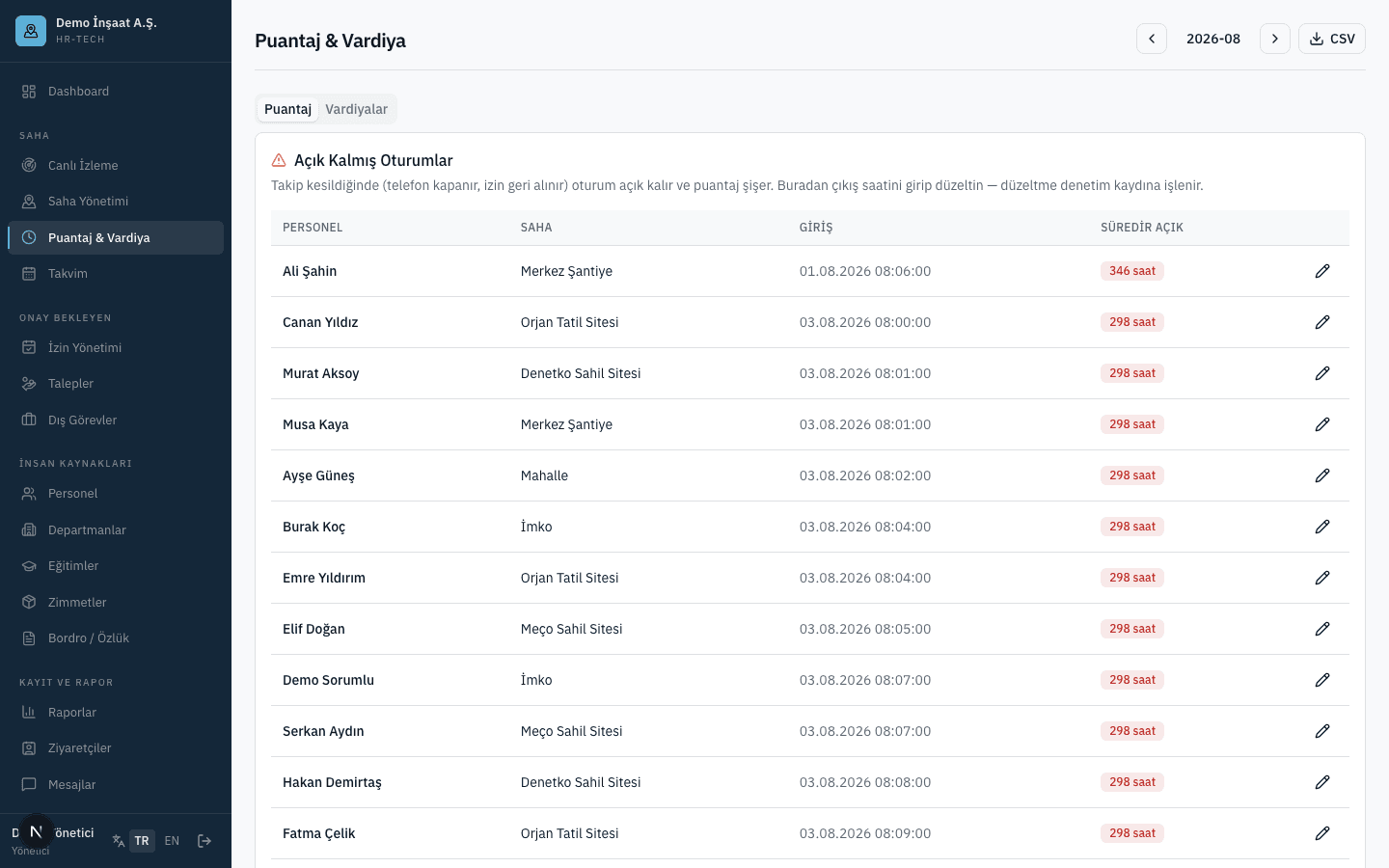
That single field record then feeds every HR process downstream. If someone steps outside the site during working hours, every manager of that site and the person's own HR manager receive an instant notification, while the employee gets a reminder to return to their post. A phone that shuts down or has its location permission revoked is spotted within minutes, so gaps never quietly inflate a timesheet. Overnight, daily timesheets are generated automatically: total time, first entry, last exit, session count. If a session was left open, it is corrected from the panel, that day's timesheet is recalculated, and the correction is written to the audit log.
Everything else lives in the same place. Leave and requests move through a multi-step approval flow where only the next approver in line can act, and a request automatically escalates to the level above when the direct manager is on leave. Annual paid-leave entitlement opens by itself on each work anniversary and is deducted from the balance once approval completes. Payslips are uploaded per period and downloaded by the employee from their phone over a secure link. Personnel files are two-tiered: occupational health details are visible within the company, while identity and financial fields are reserved for managers. Both the panel and the mobile app run in Turkish and English; companies sign themselves up, and the branch–department–employee hierarchy is in place from day one.
HR-Tech
Application Surfaces
HR teams & managers
Management Panel
People, sites, shifts, timesheets, leave, requests, personnel files, payslips, assets, training, visitors, announcements, messages, reports and the audit log in one web panel. Available in Turkish and English.
Field staff & site managers
Field Employee App
A six-tab mobile app: inside/outside site status with a running daily timer, timesheets, leave and requests, messages, announcements and profile. Managers also clear pending approvals straight from their phone.
Payroll, ERP & enterprise systems
Integration Layer
Signed webhooks stream violation and approval events into your own systems the moment they happen, while a read-only REST API exposes employee, timesheet and event data. Tokens are issued from the panel and can be revoked at any time.
HR-Tech
Modules
The product ships with 28 modules, each managing one part of the operation end to end.
Dashboard
Six headline metrics, a live list of who is currently on site and the latest site events on a single screen — the whole day at a glance, first thing in the morning.
Live Monitoring
Site boundaries and staff positions appear together on a live map. Who is on which site, and who has stepped outside, reads instantly without waiting for a refresh.
Site Management
Site boundaries are drawn by clicking on the map, and a single site may consist of several separate areas. Staff and one or more site managers are assigned to each site.
Timesheets & Shifts
Monthly timesheet grid, CSV export, correction of sessions left open, shift definitions and per-site shift assignment all in one module.
Calendar
Public holidays, approved leave and off-site duties overlaid on a monthly grid, so it takes one glance to see who will be missing and when while planning the team.
Leave Management
Incoming leave requests are approved or rejected, with the current step of the approval chain shown on the request itself. Balance movements are applied as part of the decision.
Requests
Advance, expense and overtime requests collected in a single queue. For expense claims, the receipt the employee uploaded opens right from the decision screen.
Off-Site Duties
Duties performed away from the site are recorded and approved. While an approved off-site duty is running no out-of-site violation is produced, so the employee is not warned for doing their job.
People
Employee list and detail card with personnel data, company-specific custom fields, bulk CSV import of up to 200 rows at a time, and offboarding.
Departments & Branches
The branch, department and employee hierarchy is built here. That same structure drives both who can see what and how the approval chain flows.
Training
Completed training and certificate validity dates are tracked, with anything expiring within thirty days surfaced on a warning card.
Assets
Assignments and returns are recorded against a categorised inventory. An asset can be held by only one person at a time, and returns are never deleted — the history stays intact.
Payslips & Personnel Files
Payslip documents are uploaded per period and downloaded over a short-lived secure link. Personnel files are two-tiered: occupational health fields are visible inside the company, identity and financial fields only to managers.
Reports
Four ready-made report tabs plus a report designer with column selection, filters and CSV output — so the slice you need does not have to be rebuilt from scratch every time.
Visitors
Visitors are logged by category — customer, supplier, auditor, contractor — with entry and exit times recorded, so who is on site is not limited to your own staff.
Messages
One-to-one and group chats flow instantly between the panel and mobile, keeping conversations between the field and head office out of consumer messaging apps.
Announcements
Announcements are targeted at the whole company, a specific department or a specific site, with the number of people who have read it shown on the announcement itself.
Audit Log
Who changed which field, when and to what value, captured at the database level — so when a timesheet is disputed or an audit arrives, the trail is complete.
Settings
Working hours, approval flow steps, custom fields on the employee card, the public holiday calendar, API token issuance and the webhook endpoint are all managed here.
Mobile Home
Whether they are inside or outside the site, a running counter of today's time on site and the time left until the shift ends, right at the top. Tracking is switched on or off here, and off-site duty is declared from the same screen.
Mobile Timesheet
Employees see their own daily and monthly working time on the phone — entry and exit times, daily totals and how the month is trending — so month end holds no surprises.
Mobile Leave & Requests
Leave, advance, expense and overtime requests are raised from the phone, with a receipt photo attached to expense claims, and the request's position in the approval chain is visible throughout.
Mobile Messages
One-to-one and group chats in the field employee's pocket, keeping communication with head office inside the work app rather than on personal numbers.
Announcements & Notifications
Company, department or site-targeted announcements gathered in one feed alongside return-to-site reminders, approval outcomes and tracking outage warnings.
Mobile Profile
Personnel details, payslips by period, assets currently held, completed training, preferences for six separate notification channels and the app language, all in one place.
Pending Approvals
Managers clear the leave and requests waiting on them straight from the phone while still in the field, so approvals do not wait for anyone to get back to a desk.
Event Webhook Stream
Out-of-site violations and approval events are delivered, signed, to an endpoint you choose the moment they occur — so your systems react instead of someone waiting for a notification.
REST API & Token Management
Employee, timesheet and event data is pulled through a read-only interface. Access tokens are issued from the panel, revoked when needed, and their use lands in the audit log.
HR-Tech
Screens
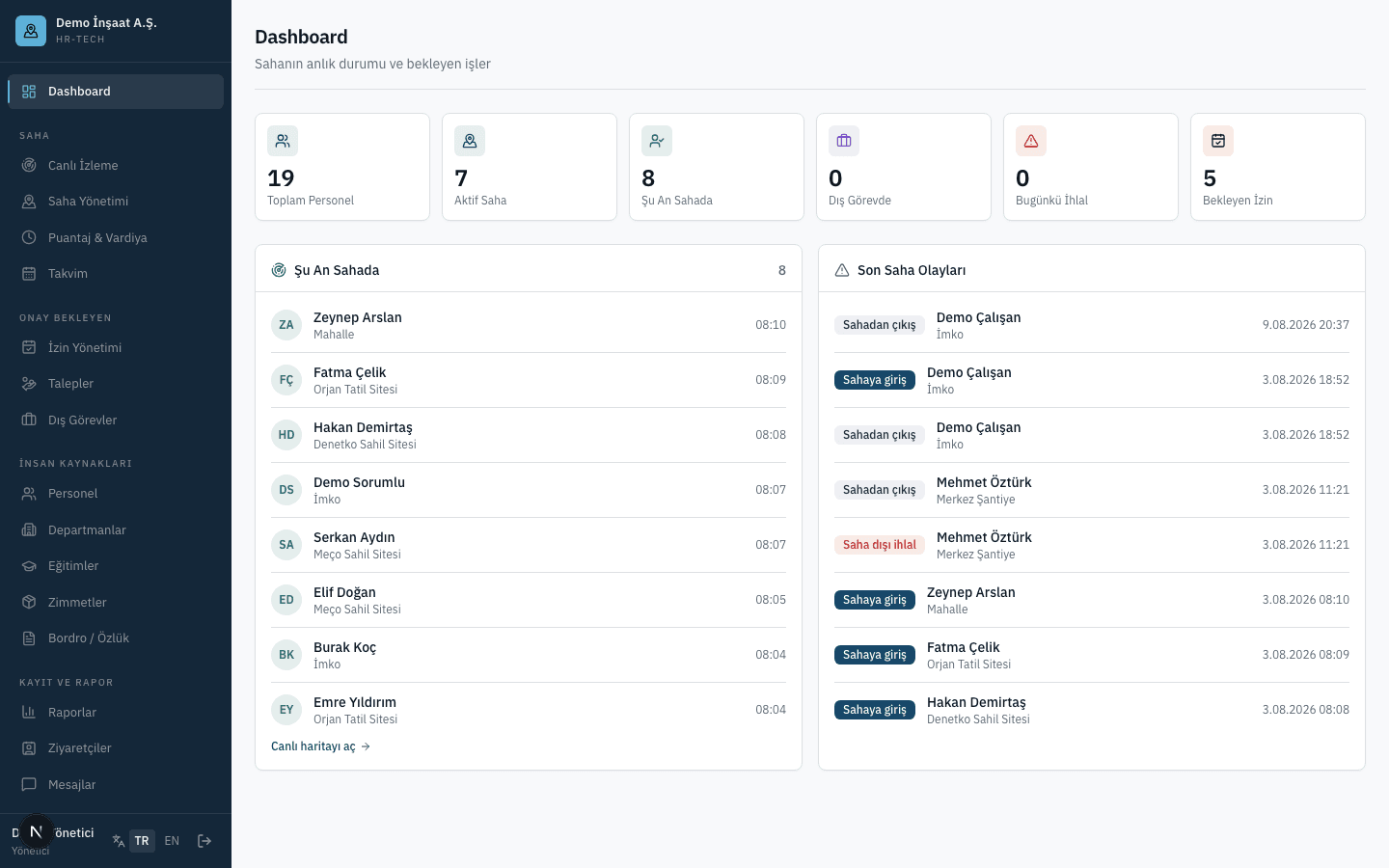
HR-Tech
Key Features
Field Tracking & Geofencing
You define what the site actually is on the map, and the system runs the rest. Who is inside, who is outside, who left and when — all of it forms without anyone reporting it manually, and because it is evaluated on the server it is not open to argument.
Site boundaries drawn on the map
You draw the site boundary by clicking on the map — no coordinates to type in, no radius to guess at. When the boundary changes, redrawing it takes a couple of minutes.
One site made of separate areas
A site can consist of several areas that do not touch — blocks 1, 4 and 7 of a complex count as the same site. Moving between them produces no violation, so nobody gets warned for doing the job.
Evaluation happens on the server
The inside-or-outside decision is made on the server, not on the phone. Records come from a single source of truth and cannot be altered by fiddling with device settings.
Only assigned, currently active sites
An employee is evaluated only against sites assigned to them and active on that date. Past assignments and other people's sites never enter the calculation.
Live view on the map
Site boundaries and staff positions appear together on one live map, so finding out who is at a site does not require calling anyone.
Visitor entry and exit tracking
Visitors are logged under customer, supplier, auditor and contractor categories with entry and exit times, so the record of who was on site is not limited to your own staff.
Timesheets, Shifts & Alerts
The timesheet stops being a spreadsheet someone fills in and becomes the natural output of what happened in the field. It is generated overnight, gaps surface in the panel, and every correction leaves a trace. Alerts arrive while the shift is still running, not afterwards.
Sessions that open on entry, close on exit
Entering a site opens a session and leaving closes it. If a session is still open at another site it is closed automatically, so nobody can appear to be working in two places at once.
Timesheets generated overnight
Every night the day's timesheet is produced automatically: total time on site, first entry, last exit and session count. There is nothing left to add up at month end.
Correcting sessions left open
Sessions that never closed are listed separately in the panel and corrected by an authorised user. The correction regenerates that day's timesheet, and who changed what is written to the audit log.
Violations limited to working hours
Out-of-site violations are only raised within defined working hours. Approved off-site duty, public holidays and out-of-hours time are exempt, so nobody drowns in pointless alerts.
Return reminders and manager alerts
An employee still outside the site during working hours is reminded to return every five minutes, with the manager kept informed. Night shifts are handled the same way.
Tracking outage detection
A device that stops reporting location is caught by a five-minute check, and both the employee and the manager are notified. When a phone dies or permission is revoked, the timesheet does not quietly inflate.
Per-site shift definition and assignment
Shifts are defined and assigned per site, and one person can work shifts at different sites on the same day. Night shifts can be set up to span the day boundary.
Leave, Requests & Approval Flow
Leave requests stop getting lost in a pile of messages, and nobody has to guess whose desk an advance request is sitting on. The approval flow is sequential, cannot be skipped, does not stall while a manager is away — and every step is recorded with who took it and when.
Sequential multi-step approvals
The approval flow is defined step by step per company and advances in order — only the approver whose turn it is can decide. A rejection at any step closes the remaining ones.
Delegation and automatic escalation
If the direct manager is on leave that day, the request escalates automatically to the level above, with safeguards against loops and cross-company hops. The standing-in manager temporarily inherits visibility over that person.
Instant alert to the first approver
When a new request is raised, the first approver is notified immediately — nobody has to wait for someone to log into the panel before the request is noticed.
Automatic leave entitlement
Annual paid-leave balances open by themselves on each work anniversary, without overwriting manual adjustments. Once approval completes, the days used are deducted automatically.
Advance, expense and overtime requests
All three request types run through the same flow. Expense claims carry a receipt photo, which the approver views right on the decision screen.
Off-site duty declaration and exemption
Work to be done away from the site is declared from the employee's phone and approved. While an approved off-site duty runs, no violation is raised and the time is not treated as lost.
Leave and duty plan on one calendar
Public holidays, approved leave and off-site duties share one monthly grid, so who will be absent is visible while planning shifts without opening another screen.
People, Records & Resources
The employee card is more than a list of names: personnel data, payslips, assets and training sit together from hire to exit. Sensitive data is not open to everyone — who can see what is separated from the start.
Two-tier personnel visibility
Occupational health fields such as blood type, emergency contact and driving licence are visible within the company, while identity and financial fields are reserved for managers — one card, two levels of access.
Bulk employee import via CSV
An existing employee list is imported by CSV, up to 200 rows at a time, using a ready template — turning setup from a matter of weeks into an afternoon.
Company-specific custom fields
Add your own fields to the employee card as text, number, date or list, so information specific to your industry no longer needs a spreadsheet on the side.
Asset tracking with preserved history
Assignments and returns run against a categorised inventory, with each asset held by one person at a time. Returns are never deleted, so who held an item in the past always remains visible.
Training validity tracking
Certificate validity dates are tracked, with anything expiring within thirty days surfaced on a warning card — so an out-of-date certificate never turns into a surprise on site.
Payslips by period with secure download
Payslip documents are uploaded per period and downloaded by the employee from their phone over a short-lived secure link, taking paper envelopes out of the process entirely.
Targeted announcements with read counts
Announcements go to the whole company, one department or one site, with the number of people who read it shown — no more guessing whether the message landed.
Integrations, Security & Compliance
This is not a closed box: your data flows into your own payroll and ERP systems. At the same time personal data is taken seriously — every change is recorded with its author and timestamp, sensitive data sits in a separate tier, and retention periods enforce themselves.
Signed webhook event stream
Out-of-site violations and approval events are delivered to your own systems, signed, the moment they occur — and the signature lets you verify the notification really came from the platform.
Read-only REST API
Employee, timesheet and event data is pulled through a read-only interface, removing duplicate data entry on the payroll or ERP side. Access tokens are issued from the panel and revoked whenever you choose.
Audit log at the database level
Who changed which field, when and to what value is captured as a matter of record, so in a dispute or an audit the trail back is complete and not open to debate.
Personal data retention periods
Location records are deleted automatically after ninety days and messages after one year, so nobody has to remember a retention period or run a manual clean-up.
Privacy notice and location control
Employees accept a privacy notice on first sign-in to the mobile app and the acceptance is recorded, while whether tracking is on remains visible on the app's home screen at all times.
Offline operation with queueing
Where there is no coverage, locations queue on the device with roughly five working days of capacity. Once connectivity returns they are sent in batches, and repeated points never enter the queue at all.
Per-person notification preferences
Six separate notification channels can be switched on or off per user, so everyone receives the alerts that matter to them without sliding into notification fatigue.
Report designer and CSV export
Build the exact slice you need with a report designer offering column selection and filters, then take it away as CSV — output that opens cleanly in your spreadsheet tool.
HR-Tech
User Roles
Every role sees only its own work; permissions are enforced at the data layer.
Company Administrator
Has access to every module: sees personnel data including identity and financial fields, defines the approval flow steps, sets working hours and the holiday calendar, issues and revokes API tokens, and manages the webhook endpoint.
Manager
Sees their own team and the sites where they are the site manager. Approves leave and requests, defines and assigns shifts, assigns staff to sites and publishes targeted announcements — sensitive financial fields remain out of scope.
Employee
Accesses their own data from the mobile app: site status and time on site today, timesheets, leave and requests, messages, announcements, payslips, assets, training records and notification preferences.
Site Manager
A special permission granted independently of role. The holder counts as the manager of everyone assigned to that site and receives its violation and tracking outage alerts — and a site can have more than one site manager.
HR-Tech
Frequently Asked Questions
How long does setup take, and how do we bring our existing employee list across?
You sign your company up yourself, then build out the branch, department and employee hierarchy. Your existing list comes in as a CSV using a ready template, up to 200 rows at a time. Site boundaries are drawn by clicking on the map, then shifts and working hours are defined. In practice, drawing the sites is the longest step — the employee side is done in minutes via import.
Our sites have no connectivity — does tracking still work there?
Yes. Where there is no connection, locations queue on the device with roughly five working days of capacity. Once connectivity returns the records are sent in batches, and because repeated points never enter the queue, no redundant data piles up. Since evaluation happens on the server, late-arriving records are still applied to the correct day and the timesheet stays consistent.
Is background tracking reliable on iOS devices?
Tracking continues without interruption while the app is open or in the background. If the user force-quits it, the operating system stops the location stream. That does not go unnoticed: a five-minute check detects the outage and notifies both the employee and the manager, so a closed app never inflates or silently truncates a timesheet.
How is location tracking handled in terms of personal data, and is employee consent obtained?
Employees accept a privacy notice on their first sign-in to the mobile app, and that acceptance is recorded. Whether tracking is active is visible on the home screen at all times. Location records are deleted after ninety days and messages after one year. Identity and financial data sit in a separate tier of the personnel file, visible only to managers, and every data change is written to the audit log with who made it and when.
Can we connect it to our payroll or ERP system?
Yes, in two ways. Signed webhooks stream out-of-site violations and approval events to an endpoint you choose the moment they occur, with the signature confirming where the data came from. A read-only REST API exposes employee, timesheet and event data. Access tokens are issued from the panel and revoked when needed. Timesheets and reports can also be exported as CSV that opens cleanly in spreadsheet tools.
How many employees can it handle, and does it support multi-branch structures?
Because everything is built on a branch, department and employee hierarchy, multi-branch organisations with teams spread across different sites are supported naturally. One person can work shifts at different sites on the same day, and a site can have more than one manager. Approvals and visibility follow that hierarchy, so growing the team does not mean rebuilding the setup — you simply add branches and departments.
How would HR-Tech work in your business?
We'll set up a personal demo environment; try it with your own data and get your questions answered.
Request a DemoOur other product: Site-Park — Property & Community Management