Property & Community Management
Site-Park
Every part of running a residential community — from dues to the guard post to the resident's phone.
Site-Park is a multi-tenant management platform that lets property management firms run many communities from one hub. Annual budgets, batch dues invoicing, online collections, the operating ledger, visitor logs and the resolutions register all live in one place. Three purpose-built apps — for managers, residents and field staff — share the same data, so anything that happens in a unit lands instantly in finance, reporting and the audit trail. It was built to replace the spreadsheets, group chats and paper incident forms that most communities still run on.
Site-Park
Overview
In community management, money usually leaks through broken records rather than bad intent. The dues table lives in a spreadsheet, payments in a bank statement, expenses in a folder, and complaints on the phone. By month end nobody agrees on who owes what — and a board that cannot answer at the general assembly loses its mandate.
Site-Park pulls that whole chain into a single system of record. You draft the annual operating budget, split each line across units using one of six allocation methods, and generate the charges in a single run. Residents pay by card from their phone, the payment automatically clears the oldest debt first, and the receipt hits the operating ledger at the same moment. Balances are never stored separately, so reports simply cannot disagree with each other.
The same fix closes the gap between the guard post and the back office. Security logs visitors and parcels from a phone, technicians close jobs with a photo, planned maintenance turns into scheduled work orders on its own, and patrol checkpoints are scanned by QR even when the connection drops. Every resident request is tracked against a target response time, and who did what, and when, is always on the record.
On top of that sits the governance layer: meeting minutes and the resolutions register, electronic general assemblies, a versioned document archive, approval flows, and an audit trail kept automatically on every financial record. At year end the audit pack exports in one click, and so does the handover pack when the management contract changes hands. A firm runs all of its communities from one account, each community's data is isolated at the database level, and every role's access to every module can be switched on or off individually.
Site-Park
Application Surfaces
Management firms, community managers & accounting
Management Panel
Budgeting, invoicing, collections, accounting, community, field operations and governance modules in one back office — plus multi-community portfolio comparison and role-based permissions.
Owners, tenants and household members
Resident App
An installable phone app: balance and payment, saved cards, requests, amenity booking, documents, polls, events, resolutions and electronic general assemblies — with instant push notifications.
Security & technical staff
Field App
Streamlined flows for staff on shift: visitor and vehicle check-in, parcel intake and handover, access-card events, job completion, incident reports, QR patrol rounds, meter readings and checklists.
Site-Park
Modules
The product ships with 67 modules, each managing one part of the operation end to end.
Units & Residents
Blocks, units, owners, tenants and household members in one register; each unit's area, land share and occupant count feed the cost allocation engine.
Unit 360 View
One screen with a unit's full history: charges, payments, requests, bookings, visitors, meter readings and documents.
Move-in & Transfer Wizard
When a unit changes hands, a guided flow transfers the balance, meter index, access cards and parking rights from the outgoing to the incoming resident.
Parking Management
Assign bays to units, manage visitor spaces, keep plate records and track every reassignment.
Access Cards
Issue cards and fobs per unit, cancel a lost card instantly, and match every swipe recorded in the field app.
Annual Operating Budget
The statutory annual budget: expense lines, allocation methods and each unit's monthly due, produced as a single document.
Batch Invoicing
Posts the period's dues and expenses to every unit in one run, distributing to the last cent, with a preview before you commit.
Exemptions & Discounts
Define standing rules for vacant units, commercial spaces or ground floors that skip elevator costs; they apply automatically on every run.
Receipts & Expenses
Record cash, transfer and card collections alongside supplier expenses; every entry hits the ledger and the unit balance immediately.
Payment Plans
Restructure accumulated debt into an instalment schedule with set terms and amounts, then track payments against the plan.
Receipts & Payment Documents
Every collection produces a numbered receipt, delivered to the resident and kept in the archive.
Autopay Mandates
With the resident's mandate, dues are charged monthly to a saved card; the mandate pauses after repeated failures and notifies both sides.
Dunning & Reminders
Staged reminders for overdue balances — push, email and a formal notice draft — with a full sending history.
Bank Feed & Reconciliation
Import the bank statement file; entries matching a payment code or unit pattern are matched to the right unit automatically, the rest are confirmed by hand.
Meter Reading & Billing
Read water, heat and electricity indexes, compute consumption differences and convert them into unit bills by tariff, sharing common consumption across units.
Meter Anomaly Alerts
Readings that fall outside a unit's historical pattern are flagged, catching leaks, faulty meters and mis-readings before billing.
Online Card Payments
A secure iyzico-powered checkout plus one-tap payment with a saved card; card numbers are never stored in the system.
Insurance Policies
Track mandatory earthquake and building policies, coverage amounts and automatic reminders before renewal dates.
Legal & Enforcement
Track the path from formal notice to enforcement file — stages, costs and recovered amounts — all linked back to the unit.
e-Archive Invoicing
Issue, send and archive management fee and other invoices electronically.
Operating Ledger
The statutory book of all income and expense movements; pick a period and export a print-ready copy.
Chart of Accounts & Trial Balance
A chart of accounts fit for community books, per-account movement listings and a period trial balance.
Year-End Close
Closes the period, carries balances into the new year and blocks retroactive entries into a closed period.
Supplier Accounts
Contracts, invoices and payment history for elevator, cleaning, landscaping and other suppliers in one account view.
Aging & Collection Performance
Receivables split by age bucket and collection rate across periods, with problem units surfaced automatically.
Budget vs. Actual
Compares budgeted figures with actual spend line by line and flags variances.
Audit & Handover Packs
Compiles the document set for the audit board and the full handover package for a change of management in one action.
Energy & SLA Analytics
Trends in common-area energy consumption and how well service requests hit their target response times.
Portfolio & Benchmarking
Compare every community in the firm's portfolio side by side, and benchmark a community's costs and collections against the anonymised median of similar communities.
Announcements
Publish notices to the whole community or selected blocks; residents get a push notification and read status is tracked.
Polls & Surveys
Collect resident opinion; in anonymous mode no screen ever shows who voted what — only the aggregate result.
Events & Neighbourhood Board
A calendar of community events plus a moderated board where residents can post to one another.
Requests & Service Levels
Faults and complaints open with a category-based target response and resolution time, get assigned to staff, and escalate when they run late.
Amenity Booking
A calendar for meeting rooms, gyms and social facilities; double bookings are blocked at the database level and each unit has a weekly quota.
Work Order Board
Every field job on one board — assignee, priority, status and the completion photo all on the same card.
Preventive Maintenance
Define service intervals for elevators, generators or fire systems; when one comes due, the platform creates the work order by itself.
Asset Register
Brand, model, warranty, service history and related documents for every asset, kept in one record.
Incidents & Reports
On-site incidents become automatically numbered reports with photos attached and the relevant unit linked.
Emergency Management
Switch on emergency mode during an earthquake or fire; residents check in as safe and the platform lists who has not responded.
Inventory & Purchasing
Track cleaning and technical supplies; when an item hits its reorder level a purchase request opens and goes for approval.
Staff, Shifts & Leave
Personnel records, shift rosters, leave requests and a periodic performance scorecard for on-site staff.
Caretaker Payroll & Severance Provision
Calculates payroll with the exemptions and contribution rates specific to residential caretakers, and accrues the severance provision period by period.
Meetings & Resolutions Register
Agendas, attendance, resolutions and follow-through on each decision, with the resolutions register exported in statutory format.
Electronic General Assembly
Publish agenda items, collect votes weighted by land share, watch quorum calculate live and turn the outcome into minutes.
Approval Workflows
Multi-step approvals for spending, purchasing and discounts, with a permanent record of who approved what and when.
Custom Form Builder
Build your own checklists, application forms or inspection sheets without code and publish them straight to the field.
Document Archive
Management plans, contracts, permits and reports stored with version history, and visibility set per role.
Setup Wizard & CSV Import
Stand up a new community step by step and import existing units, residents and balances from spreadsheet files with validation.
Role Permission Matrix
Toggle view, create, edit and delete rights for every role on every module, one cell at a time.
Module Packages
Switch modules on or off per customer, so a small building sees a lean interface while a large community uses the full range.
Audit Trail
Critical records automatically log who changed what and when; financial entries are never deleted — a reversal always leaves a trace.
Public Micro-site
A public-facing page for the community: contact details, notices and whatever summary information the board chooses to share.
AI Assistant
An opt-in helper that answers questions about your community data, drafts announcements, triages incoming requests and reads details off an invoice image.
Balance & Payment
Residents see a line-by-line breakdown of what they owe and pay by card on the spot, with the payment clearing the oldest debt first.
Saved Cards & Autopay
Save a card once and pay later without re-entering the security code, or set up a monthly autopay mandate.
My Requests
Report a fault or complaint with a photo, then follow its status and who is handling it from the app.
My Bookings
Book social facilities and function rooms from the calendar, with busy slots and the weekly quota shown up front.
Documents, Resolutions & Budget
Shared documents, adopted resolutions and the annual budget are open to residents — accountability starts with access.
Polls, Events & Assembly Participation
Vote in polls, RSVP to events and cast a land-share weighted vote in the electronic general assembly.
Visitor Pre-registration
Residents announce a guest in advance so the record is already waiting on the guard's screen and nobody queues at the gate.
Emergency Check-in
In emergency mode a resident marks themselves safe with one tap, and management immediately sees who is unaccounted for.
Visitor & Vehicle Check-in
Security logs a visitor or vehicle in seconds, links it to the destination unit and closes the record on exit.
Parcel Intake & Handover
Incoming parcels are logged against a unit, the resident gets a notification, and the record closes at handover.
My Jobs
Technicians see the jobs assigned to them and close each one with a photo as proof of work.
Patrol Rounds
Scan the code at each checkpoint to prove the round was actually walked; with no connection the scans queue up and sync later.
Meter Reading
Staff walk the meters, record the index with a photo, and the values flow straight into billing.
Checklists & Leave Requests
Daily and weekly checklists are completed on site, and staff file leave requests from the same app.
Site-Park
Screens
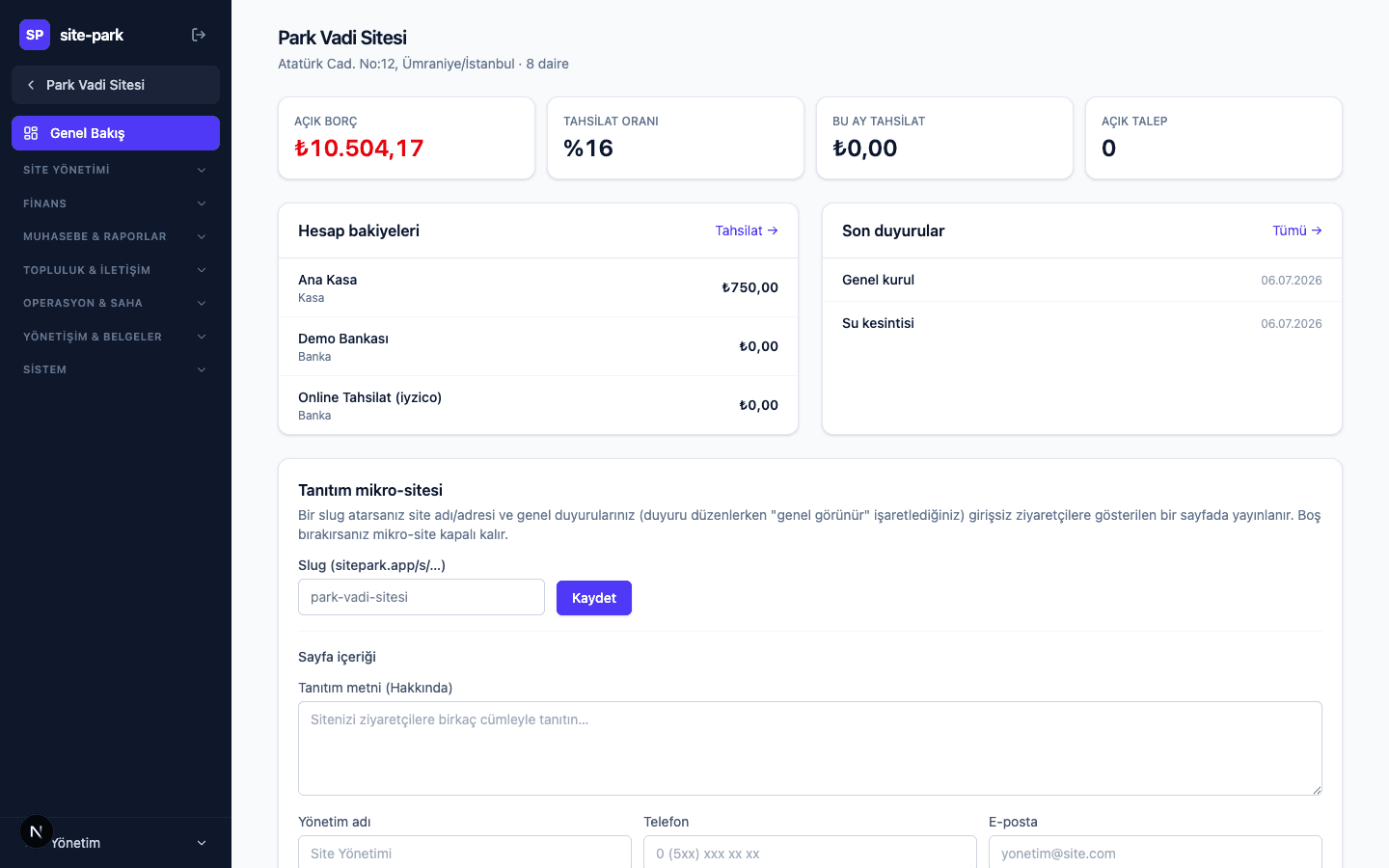
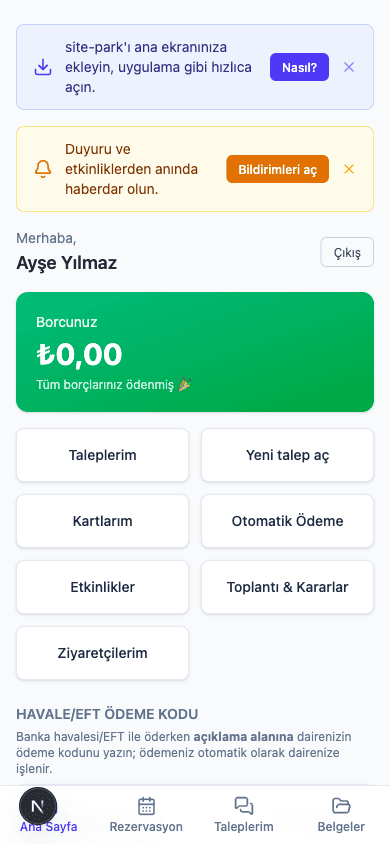
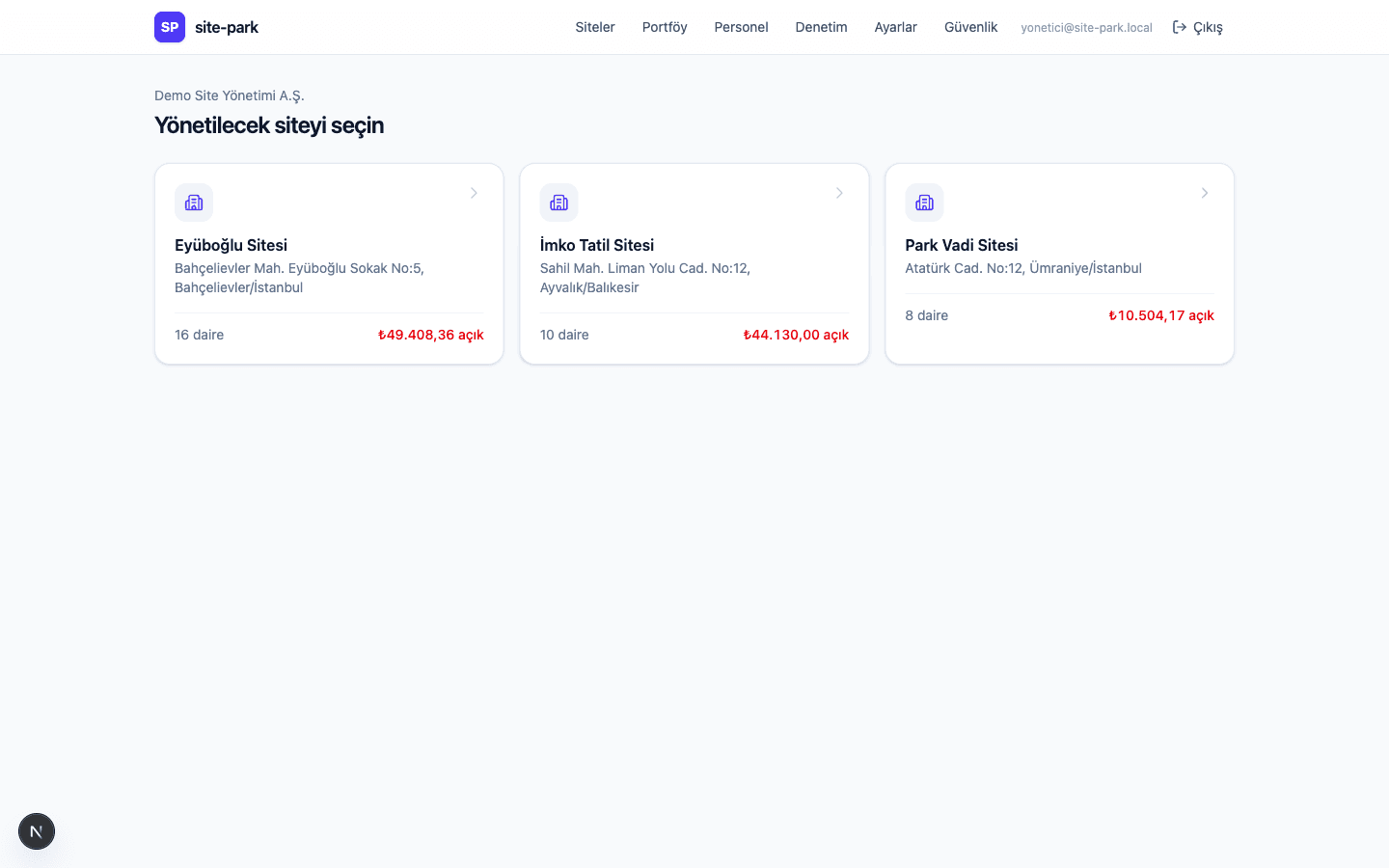
Site-Park
Key Features
Finance & Collections
Every cash movement, from charge to receipt, runs through one engine with transparent rules and results that always reconcile.
Six cost allocation methods
Each expense line can be split equally, by floor area, by land share, by occupant count, at a fixed amount per unit type, or by metered consumption — whatever your management plan requires.
Cent-perfect distribution
When a total will not divide evenly, the leftover cents are not rounded away but allocated by a fair rule — so the distributed sum always equals the original amount exactly.
Oldest-debt-first settlement
Every incoming payment automatically clears the oldest open charge first, with any surplus held as credit — so nobody argues about which payment covered what.
Card payments and saved cards
Residents pay through iyzico's secure checkout; once a card is saved, later payments complete without re-entering the security code. Card numbers are never stored in the system.
Autopay mandates
Residents who set up a mandate are charged automatically each month. After three consecutive failures the mandate pauses itself and notifies both the resident and the office.
Automatic bank reconciliation
Import the bank movement file; entries whose description carries a matching payment code or unit reference are linked to the right unit automatically, and the rest go to a manual matching screen.
Late interest and dunning
Overdue balances accrue monthly late interest automatically, and the escalation path from reminder notifications to a formal notice draft is tracked end to end.
From meter to bill
Readings become consumption differences, consumption becomes an amount by tariff, and common usage is shared across units. Anything far outside a unit's historical pattern is flagged before it is billed.
Accounting & Reporting
The same data drives both daily operations and the statutory books, so every document the audit board or general assembly asks for is one click away.
The operating ledger, in statutory format
Every income and expense movement posts to the ledger automatically. Pick a period and export it in the layout regulation expects — no second set of books to keep.
Chart of accounts, trial balance and year-end close
Per-account movement listings and a period trial balance are always available. Closing the year carries balances forward and locks the period against retroactive entries.
Aging and collection performance
Receivables are bucketed by age and the collection rate is tracked across periods, turning who owes what and for how long from guesswork into data.
Budget versus actual
Budgeted figures are compared with actual spend line by line, and the lines that drift are flagged early enough to correct mid-year.
Audit pack and handover pack
The document set an audit board will ask for is compiled in one action, and when management changes hands the complete files, books and balances transfer as a single handover pack.
Transparency poster and compliance calendar
The period's income and expense summary prints as a single notice-board page, while obligations like insurance renewals, elevator inspections and the annual assembly are surfaced on a compliance calendar.
Portfolio view and anonymous benchmarking
A firm compares every community it runs in one table, and a community's costs and collections are measured against the anonymised median of similar communities.
Data quality checks
Missing floor areas, empty land shares or residents without contact details — the gaps that would break a calculation — are gathered into one list and closed off one by one.
Community & Communication
Resident communication moves out of scattered chat groups and into a channel that is recorded and traceable.
Announcements with push notifications
Publish to the whole community or selected blocks, land instantly on residents' phones and track who has seen it — no more repeating the same notice three times.
Genuinely anonymous polls
When a poll is marked anonymous, no admin screen ever reveals who voted what — only the distribution. That is how you get honest answers on sensitive topics.
Requests tracked against target times
Each request category carries a target response and resolution time. The clock starts the moment a request opens, and jobs approaching their deadline are pushed to the top.
Conflict-free amenity booking
Two bookings for the same slot are blocked at the database level, so even simultaneous attempts leave exactly one booking. A weekly quota per unit keeps it fair.
Event calendar and neighbourhood board
Community events are announced on a calendar with RSVPs collected, and a moderated neighbourhood board lets residents post to one another.
Visitor pre-registration
A resident announces a guest ahead of time and the record is waiting on the guard's screen, removing the phone calls and the queue at the gate.
The resident app installs to the phone
The app adds itself to the home screen without an app-store download and still delivers push notifications — adoption climbs once the install barrier disappears.
Field & Operations
Work done on site is recorded as it happens, with proof attached, so the office sees it live rather than after the fact.
Preventive maintenance creates its own work orders
Set a service interval for elevators, generators or fire systems and the work order opens on schedule and lands with the right technician. Nothing falls off the calendar.
Photo-verified job completion
Technicians attach a photo when closing a job, so what was reported as done can be shown as done — to the board and to the resident.
QR patrol rounds that work offline
Checkpoints are scanned with a phone, recording the time and route of each round. If the connection drops, scans queue locally and sync themselves once it returns.
Auto-numbered incident reports
Every on-site incident becomes a sequentially numbered report, documented with photos and linked to the relevant unit. Paper reports cannot go missing once there is no paper.
Visitor, vehicle and parcel logs
Entries, exits and parcel handovers are logged in seconds, matched to a unit and searchable later — so when a dispute comes up, there is a record.
Inventory and purchase requests
Supplies are tracked, and an item at its reorder level opens a purchase request that enters the approval flow — spending becomes visible before it happens.
Shifts, leave and performance
Build the shift roster, receive leave requests in-app, and let the periodic performance scorecard build itself from completed jobs and patrol data.
Emergency mode and safety check-in
Switch on emergency mode during an earthquake or fire; residents mark themselves safe with one tap and everyone who has not responded appears on a single list.
Governance & Documents
The chain from meeting to resolution to execution is preserved with its paperwork, so accountability stops being extra work.
Meetings and the resolutions register
Agendas, attendance and resolutions are recorded, the register exports in statutory format, and whether each decision was actually carried out is tracked separately.
Electronic general assembly
Publish the agenda, collect votes weighted by land share, watch quorum calculate live and turn the outcome into minutes — participation no longer depends on filling a room.
Versioned document archive
Management plans, contracts and reports are kept with full version history, and visibility is set separately for each role and for residents.
Multi-step approval flows
Spending, purchasing and discounts above a set threshold route for approval, and who approved what and when stays on the record permanently.
Custom form builder
Design your own checklists, inspection sheets or application forms without code and publish them straight into the field app.
Audit and risk tracking
Audit board findings, the actions raised against them and the risk register are all tracked, and anything left open carries into the next audit.
Public micro-site
Publish a public page for the community whose content the board controls, giving the outside world one address for contact details and notices.
Security & Access Control
Who can see what, and how records are protected, is part of the product's foundation rather than a setting bolted on later.
Role-by-module permission matrix
View, create, edit and delete rights are toggled cell by cell for every role and module — your accountant need not see visitor logs, and your guard need not see balances.
Communities are isolated from each other
Each firm's and each community's data is separated at the database level, so seeing the wrong community's data is impossible even if an application bug tried.
Financial records are never deleted
An incorrect charge or receipt is not removed but marked as reversed, with the original still in the trail. Quietly rewriting history is not an option.
Balances are always recalculated
A unit's balance is never stored and updated — it is recomputed from movements on every query, so two reports cannot disagree.
Automatic audit trail
Every change on financial and critical records is logged automatically with who, when and what changed, so any line an auditor questions can be answered.
Per-customer module packages
Modules are switched on or off per customer, so a small building gets a lean interface while a corporate management firm uses the full range.
Opt-in AI assistant
AI features are off by default; once enabled, the assistant answers questions about your community data, drafts announcements, triages incoming requests and reads details off an invoice image.
Site-Park
User Roles
Every role sees only its own work; permissions are enforced at the data layer.
Super Admin
The management firm's account owner — creates communities, defines users, and controls the role permission matrix and the active module package.
Community Manager
Runs day-to-day management — announcements, requests, work orders, bookings, meetings and field operations.
Accounting
Owns the financial operation — budgets, invoicing, collections, bank reconciliation, the ledger and reporting.
Security Staff
Handles visitor and vehicle check-in, parcel intake and handover, access-card events and patrol rounds from the field app.
Technical Staff
Completes assigned jobs with photo proof, reads meters, fills in checklists and files incident reports.
Resident
As an owner, tenant or household member, sees and pays their balance, opens requests, books amenities, reads documents and votes in the assembly.
Site-Park
Frequently Asked Questions
How long does it take to go live?
The setup wizard walks you through blocks, units and residents step by step, and if your existing lists are tidy the first community is usually live within a few days. Most of that time goes into verifying data like floor areas and land shares rather than software setup — get those right and the cost allocation is right too.
Can we bring across our existing units, residents and balances?
Yes. Units, residents, opening balances and meter indexes import from spreadsheet files, and a validation screen shows any bad rows before a single record is written. For most communities the cleanest route is to start from opening balances rather than migrating years of old books.
Does this replace our accountant's software?
Site-Park keeps the community's operating ledger and community accounts in full, and the reports for the audit board and general assembly come straight out of it. The management firm's own corporate accounting is a separate matter and usually stays where it is — Site-Park hands that side ready-made period reports and listings.
How do we know residents will actually use the app?
The resident app needs no app-store download, adds itself to the home screen and sends notifications. The two things that drive adoption hardest are seeing a balance and paying it on the spot, and following a request you opened. For residents who never adopt it, cash and transfer collections are still recorded exactly as before.
How are our records and residents' personal data protected?
Each firm's and each community's data is isolated at the database level, and access is granted role by role and module by module. Financial records are never deleted — a reversal leaves a trace — and every change is written to the audit trail with who and when. Card details are never stored in the system; payments run through a certified payment provider.
How many communities and units can one account handle?
The platform is multi-tenant by design, so there is no structural limit to how many communities sit under one account — the portfolio screen compares them all in one table and you switch between them in a click. A single-building administrator uses the same platform and, through the module package, sees only the screens they need.
How would Site-Park work in your business?
We'll set up a personal demo environment; try it with your own data and get your questions answered.
Request a DemoOur other product: App-Rest — Restaurant Management System